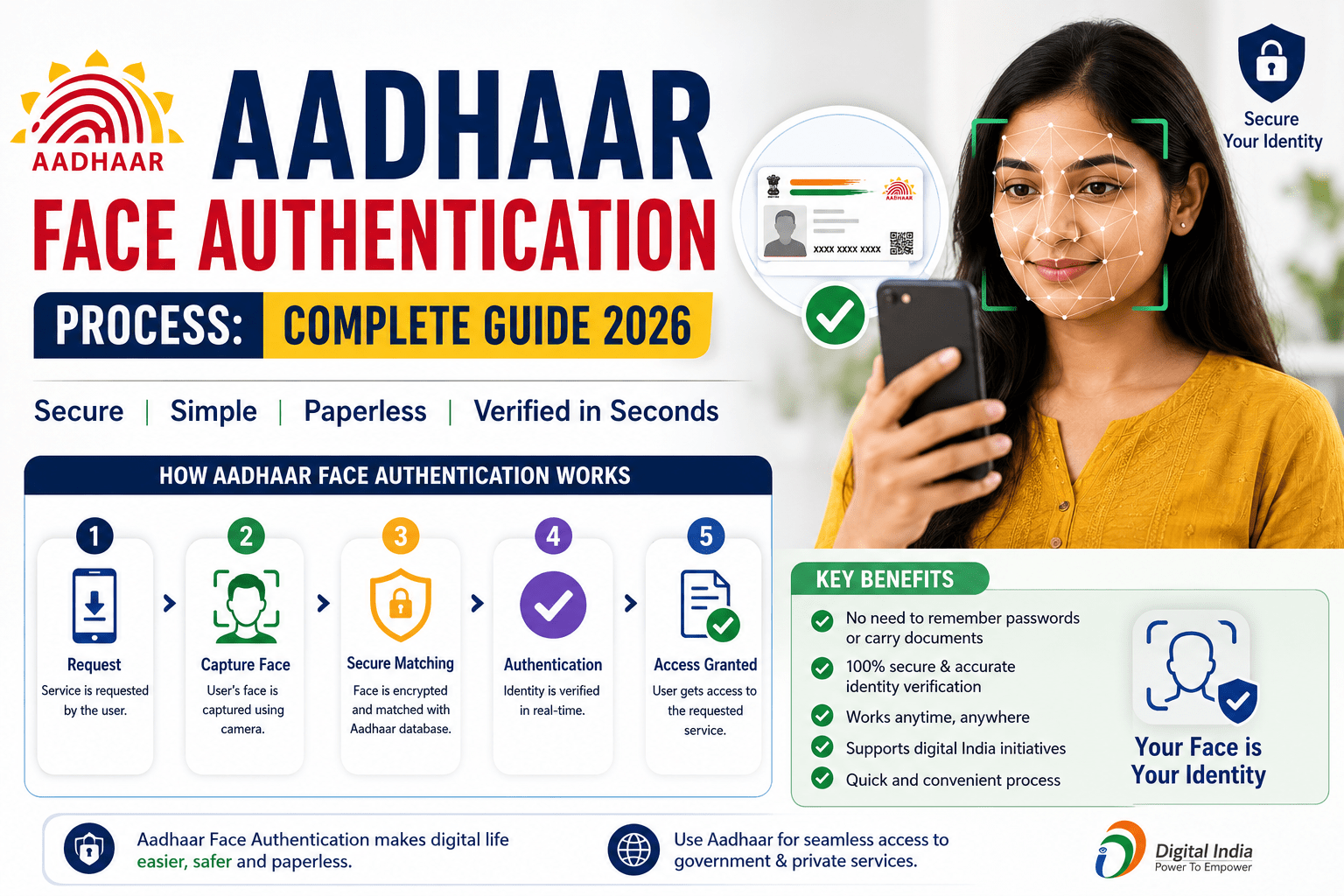
Aadhaar Face Authentication is a secure digital identity verification method introduced by the Unique Identification Authority of India (UIDAI). It uses facial recognition technology to verify an Aadhaar holder’s identity by matching their live face image with the photograph stored in the Aadhaar database. Face Authentication can be used as a standalone authentication method or combined with fingerprint or iris authentication for enhanced security.
Today, Aadhaar Face Authentication is widely used for eKYC, government welfare schemes, banking services, telecom verification, attendance systems, healthcare, pension verification, and digital service delivery. It provides a convenient solution for users whose fingerprints or iris scans may not authenticate successfully.
This guide explains the Aadhaar Face Authentication Process, eligibility, benefits, required documents, step-by-step authentication process, supported devices, and frequently asked questions.
What is Aadhaar Face Authentication?
Aadhaar Face Authentication is a biometric authentication service developed by UIDAI that verifies an individual’s identity by comparing a live facial image captured through a smartphone or camera-enabled device with the photograph stored in the Aadhaar database.
This technology improves accessibility and enables secure authentication without requiring fingerprint or iris scans in many use cases.
Aadhaar Face Authentication Highlights
| Particular | Details |
|---|---|
| Service Name | Aadhaar Face Authentication |
| Issued By | Unique Identification Authority of India (UIDAI) |
| Authentication Method | Facial Recognition |
| Mode | Online |
| Beneficiaries | Aadhaar Holders |
| Purpose | Identity Verification |
| Technology | AI-based Face Recognition |
| Official Website | https://uidai.gov.in |
Benefits of Aadhaar Face Authentication
Some major benefits include:
- Contactless identity verification.
- Quick and secure authentication.
- Useful when fingerprint authentication fails.
- Supports digital KYC (eKYC).
- Reduces identity fraud.
- Enables seamless access to government services.
- Easy verification through smartphones and tablets.
- Improves accessibility for senior citizens and manual workers.
Where is Aadhaar Face Authentication Used?
The service is commonly used in:
- Government welfare schemes
- Pension verification
- Banking and financial services
- Telecom SIM verification
- Healthcare services
- Public Distribution System (PDS)
- Digital KYC
- Employee attendance systems
- Insurance services
- Educational institutions
Eligibility
To use Aadhaar Face Authentication, you should:
- Be an Aadhaar holder.
- Have an active Aadhaar number.
- Use an authorized application or service integrated with UIDAI Face Authentication.
- Allow camera access on the device.
Requirements
Generally, the following are required:
- Aadhaar Number or Virtual ID (VID)
- Smartphone, tablet, or computer with a camera
- Stable internet connection
- Authorized application using UIDAI Face Authentication
- Adequate lighting for face capture
Aadhaar Face Authentication Process
Follow these steps:
Step 1: Open the Authorized Application
Launch the government department, bank, or service provider’s application that supports Aadhaar Face Authentication.
Step 2: Enter Aadhaar Details
Provide your:
- Aadhaar Number, or
- Virtual ID (VID)
Step 3: Grant Camera Permission
Allow the application to access your device’s camera.
Step 4: Capture Live Face
Position your face within the camera frame and follow the on-screen instructions.
The system may ask you to:
- Blink your eyes.
- Move your head slightly.
- Look directly at the camera.
These actions help confirm liveness and reduce spoofing attempts.
Step 5: Face Matching
The captured image is securely transmitted for authentication and compared with the photograph associated with your Aadhaar.
Step 6: Authentication Result
If the facial image matches successfully, your identity is authenticated, and the requested service continues.
Tips for Successful Face Authentication
For better authentication success:
- Ensure good lighting.
- Remove sunglasses or face coverings.
- Keep your face fully visible.
- Hold the device steady.
- Look directly into the camera.
- Maintain a stable internet connection.
- Clean your camera lens before authentication.
Common Reasons for Authentication Failure
Authentication may fail due to:
- Poor lighting.
- Blurred camera image.
- Face not properly aligned.
- Internet connectivity issues.
- Outdated Aadhaar photograph.
- Camera permission denied.
- Unsupported application.
- Temporary server issues.
How to Improve Authentication Success
If authentication fails:
- Try again in better lighting.
- Keep your face centered.
- Clean the camera lens.
- Remove masks or dark glasses.
- Update your Aadhaar photograph if it has changed significantly.
- Ensure you are using an authorized application.
Security Features
UIDAI’s Face Authentication service includes multiple security measures, such as:
- AI-based facial recognition.
- Live face detection (liveness checks).
- Encrypted communication.
- Secure Aadhaar authentication infrastructure.
- Protection against spoofing and replay attacks.
Frequently Asked Questions (FAQs)
What is Aadhaar Face Authentication?
It is a biometric authentication service that verifies an individual’s identity using facial recognition technology linked to their Aadhaar record.
Is Face Authentication secure?
Yes. UIDAI uses secure biometric matching, encrypted communication, and liveness detection to help protect against fraud and unauthorized access.
Can Face Authentication replace fingerprints?
In many services, Face Authentication can be used when supported by the service provider. Some applications may also combine face authentication with fingerprint or iris verification for additional security.
Do I need a smartphone?
A smartphone, tablet, or any compatible device with a camera can generally be used, depending on the service provider’s application.
What should I do if Face Authentication fails?
Check your lighting, internet connection, and camera quality. If your appearance has changed significantly since Aadhaar enrollment, consider updating your Aadhaar photograph at an Aadhaar Enrollment/Update Centre.
Conclusion
The Aadhaar Face Authentication Process provides a fast, secure, and convenient way to verify identity using facial recognition technology. It enhances digital service delivery by enabling contactless authentication across banking, government schemes, healthcare, telecom, and other sectors. By following the correct steps and ensuring good lighting and camera quality, users can complete authentication quickly and securely.