DigiLocker is one of India’s most useful digital services launched under the Digital India initiative. Developed by the Ministry of Electronics and Information Technology (MeitY), DigiLocker allows citizens to securely store, access, share, and verify government-issued documents in digital format. Instead of carrying physical copies of documents such as your Aadhaar Card, Driving Licence, Vehicle RC, PAN Card, or academic certificates, you can access them anytime through your DigiLocker account.
In 2026, creating a DigiLocker account has become simple and can be completed within a few minutes using your mobile number or Aadhaar. Once registered, you can fetch digitally issued documents from various government departments and use them wherever legally accepted.
This guide explains everything about DigiLocker Registration 2026, including eligibility, required details, step-by-step registration process, benefits, supported documents, security features, and FAQs.
What is DigiLocker?
DigiLocker is a secure cloud-based digital document wallet that enables Indian residents to store and access authentic electronic documents issued by government departments, educational institutions, and other authorized organizations. Documents available in DigiLocker are digitally signed and are legally valid under the Information Technology Act.
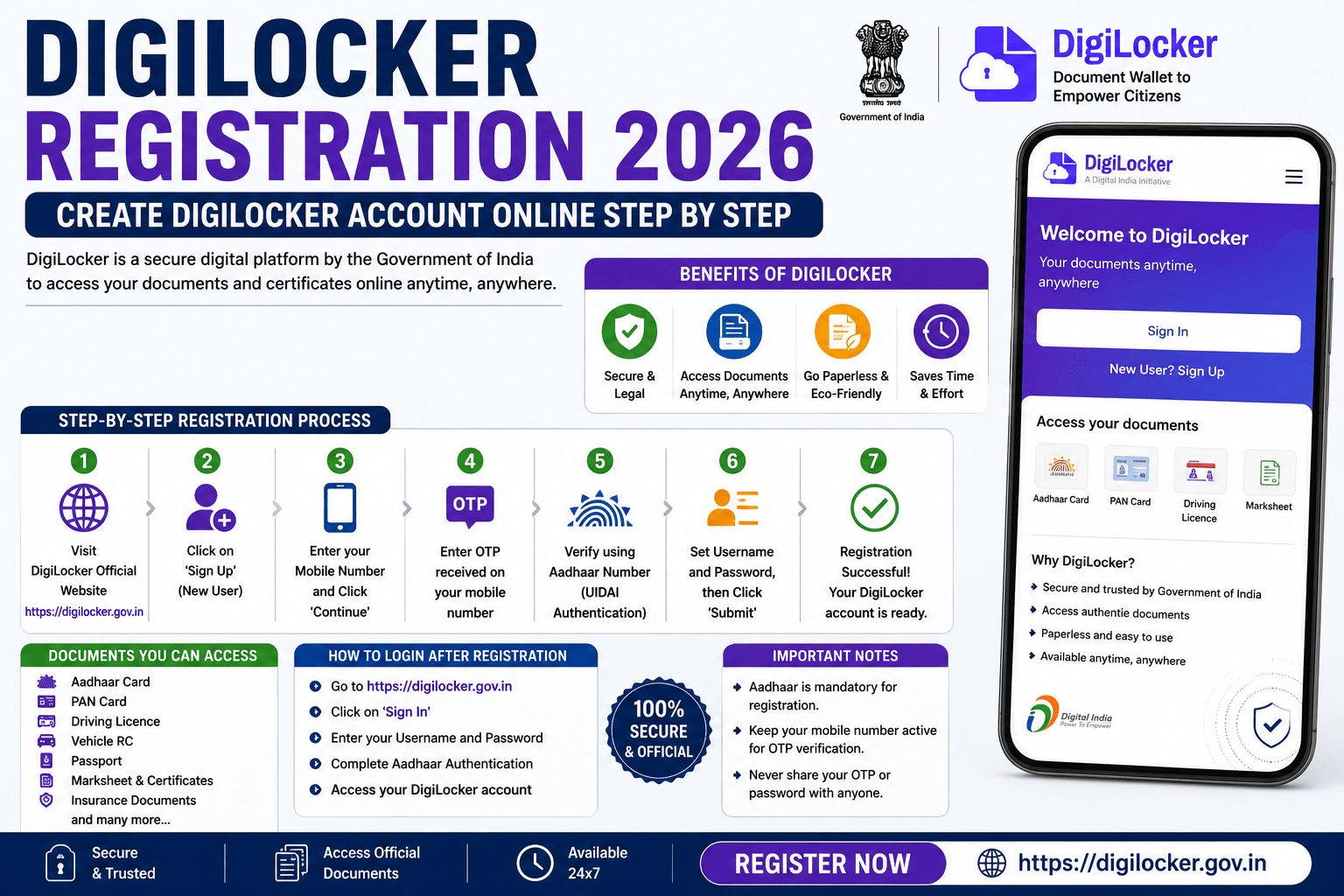
Benefits of DigiLocker
Creating a DigiLocker account offers several advantages:
- Store important documents securely online.
- Access documents anytime and anywhere.
- Share verified documents digitally.
- Reduce the need to carry physical documents.
- Download government-issued certificates instantly.
- Paperless and eco-friendly document management.
- Secure cloud storage with two-factor authentication.
- Accepted by many government departments and institutions.
Who Can Register for DigiLocker?
You can create a DigiLocker account if you:
- Are an Indian resident.
- Have an active mobile number.
- Can complete OTP verification.
- Have an Aadhaar number (recommended for accessing additional services).
Details Required for DigiLocker Registration
Before registering, keep the following information ready:
- Mobile Number
- Aadhaar Number (optional during sign-up but recommended for full functionality)
- Email ID (optional)
- OTP received on your mobile
How to Register on DigiLocker Online 2026
Follow these simple steps to create your DigiLocker account.
Step 1: Visit the Official DigiLocker Website
Open the official DigiLocker portal and click Sign Up.
Step 2: Enter Your Mobile Number
Enter your active mobile number and click Continue.
Step 3: Verify Mobile Number
Enter the OTP received on your mobile phone to verify your number.
Step 4: Create Your Account
Fill in the required details:
- Full Name
- Date of Birth
- Gender
- Username
- Security PIN
Choose a unique username for future logins.
Step 5: Link Aadhaar (Recommended)
Enter your Aadhaar number and complete OTP verification.
Linking Aadhaar allows DigiLocker to fetch your government-issued digital documents automatically.
Step 6: Registration Completed
Your DigiLocker account is now ready to use.
You can immediately start accessing available digital documents or upload your own documents.
How to Fetch Government Documents in DigiLocker
After registration:
- Log in to DigiLocker.
- Click Issued Documents or Search Documents.
- Select the issuing department.
- Enter the required details.
- Your digital document will be added to your DigiLocker account.
Documents Available in DigiLocker
Depending on eligibility and issuing authorities, DigiLocker can provide access to:
- Aadhaar Card
- PAN Card
- Driving Licence
- Vehicle Registration Certificate (RC)
- Insurance Policy
- Academic Mark Sheets
- Degree Certificates
- Birth Certificate
- Caste Certificate
- Income Certificate
- Passport-related documents
- Vaccination Certificates
- Government-issued certificates and licences.
How to Upload Personal Documents
Apart from issued documents, you can upload your own files.
Steps:
- Log in to DigiLocker.
- Open Uploaded Documents.
- Click Upload.
- Select the file.
- Save it securely in your account.
Security Features of DigiLocker
DigiLocker uses multiple security measures to protect user information.
Some important features include:
- OTP-based login
- Two-factor authentication
- Secure cloud storage
- Encrypted data transmission
- Digitally signed government documents
- Secure document sharing
- Privacy protection.
Where Can DigiLocker Documents Be Used?
Documents stored in DigiLocker are accepted by many organizations, including:
- Government Departments
- Passport Seva Kendras
- Educational Institutions
- Banks
- Insurance Companies
- Transport Departments
- Recruitment Agencies
- Universities
Common Registration Problems
Users may face registration issues because of:
- Incorrect mobile number.
- OTP not received.
- Weak internet connection.
- Username already exists.
- Aadhaar verification failure.
- Temporary server issues.
Important Tips Before Registering
Keep these points in mind:
- Register only through the official DigiLocker website or app.
- Use your own mobile number.
- Choose a strong Security PIN.
- Link Aadhaar for additional features.
- Never share your OTP or PIN.
- Beware of fake DigiLocker websites and apps pretending to be official.
Frequently Asked Questions (FAQs)
Is DigiLocker free to use?
Yes. DigiLocker is a free service provided by the Government of India.
Can I register without Aadhaar?
Yes. You can create an account using your mobile number. However, linking Aadhaar unlocks additional services such as fetching government-issued documents.
Are DigiLocker documents legally valid?
Yes. Digitally issued documents available through DigiLocker are legally valid and accepted by many government departments and institutions.
Can I access DigiLocker on my mobile?
Yes. DigiLocker is available through its official Android and iOS applications as well as the web portal.
Is DigiLocker safe?
Yes. DigiLocker uses secure authentication, encryption, and cloud security measures to protect users’ documents and personal information.
Conclusion
DigiLocker Registration 2026 is a quick and convenient way to create your digital document wallet and securely access important government-issued documents anytime. Whether you need your Aadhaar Card, Driving Licence, Vehicle RC, academic certificates, or other official documents, DigiLocker eliminates the need to carry physical copies while ensuring authenticity and security. Registering through the official DigiLocker portal and linking your Aadhaar can help you make the most of India’s digital governance ecosystem.
Read More: PAN-Aadhaar Link Status Check 2026: How to Verify PAN-Aadhaar Linking Online