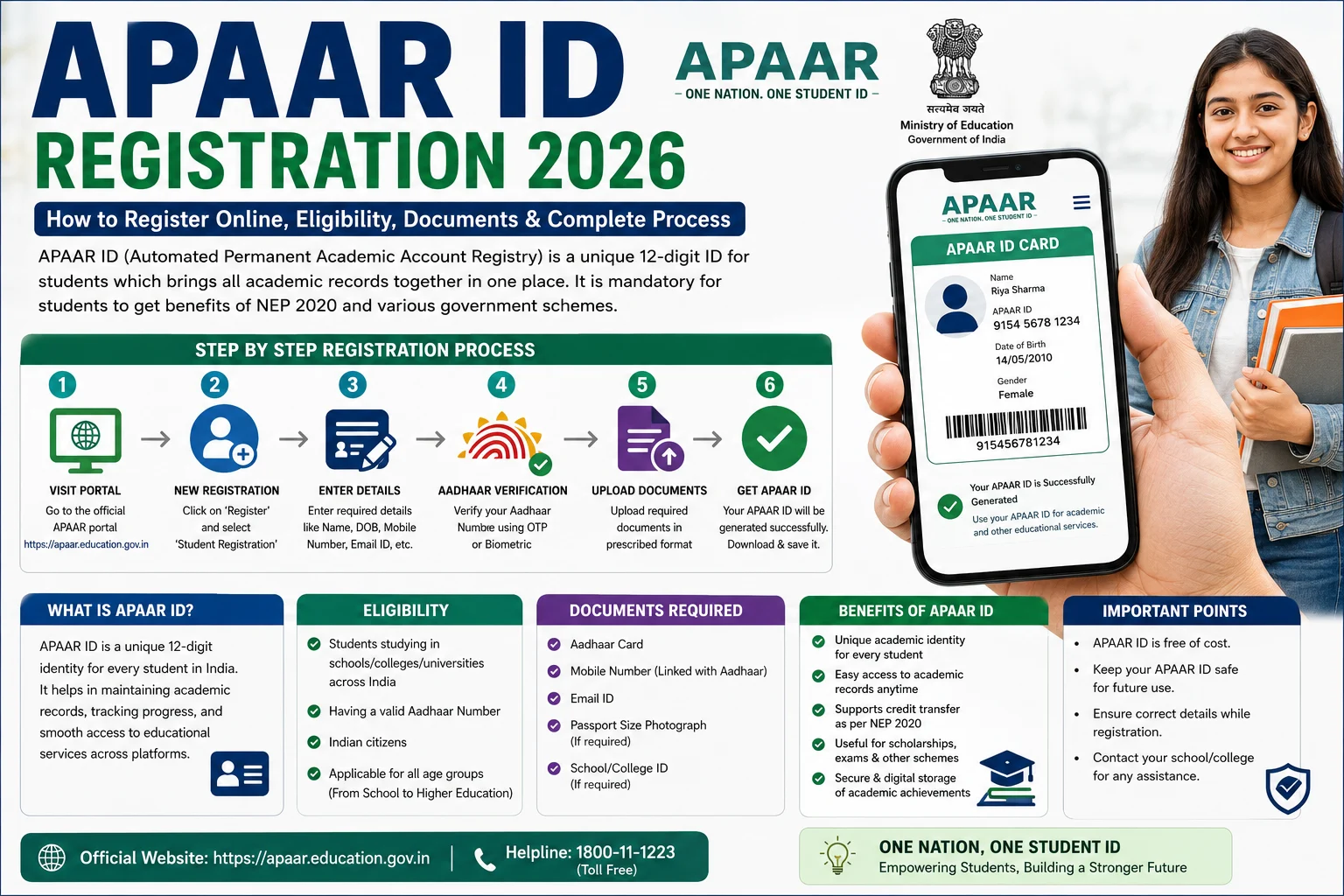
The APAAR ID (Automated Permanent Academic Account Registry) is a unique digital student identification number introduced under the National Education Policy (NEP) 2020 as part of the “One Nation, One Student ID” initiative. It helps students maintain a lifelong digital record of their academic journey, including school education, higher education, certificates, scholarships, credits, achievements, and other learning records.
In 2026, students can obtain an APAAR ID through their school or college. In many cases, eligible students can also access or generate it using DigiLocker, after completing Aadhaar verification and institutional verification. Once generated, the APAAR ID becomes available in the student’s DigiLocker account as a digital document.
This guide explains everything about APAAR ID Registration 2026, including eligibility, required documents, registration process, benefits, status check, download process, and frequently asked questions.
What is APAAR ID?
APAAR stands for Automated Permanent Academic Account Registry. It is a unique student identification system developed by the Ministry of Education to create a single digital academic identity for every student in India.
The APAAR ID securely stores academic records throughout a student’s educational journey. As a result, students can easily access verified certificates, mark sheets, academic credits, and other educational records whenever required.
Objectives of APAAR ID
The Government introduced APAAR ID to modernize education records and simplify student services.
Its primary objectives include:
- Create a unique academic identity for every student.
- Maintain lifelong digital academic records.
- Reduce duplication and paper-based documentation.
- Support seamless transfer between schools and colleges.
- Enable easy verification of educational credentials.
- Integrate with DigiLocker and the Academic Bank of Credits (ABC).
Who Can Apply for APAAR ID?
The following students are generally eligible:
- School students.
- College students.
- University students.
- Students enrolled in recognized educational institutions.
- Learners participating in institutions integrated with the APAAR ecosystem.
Documents Required for APAAR ID Registration
Before starting the registration process, keep the following information ready:
- Aadhaar Card
- Mobile Number linked with Aadhaar
- Student ID or PEN/UDISE+ ID (where applicable)
- School or College Details
- Parent or Guardian Consent (for minor students)
- DigiLocker Account (recommended)
How to Register for APAAR ID Online 2026
Follow these simple steps to complete your APAAR ID registration.
Step 1: Create or Log in to DigiLocker
Visit the official DigiLocker portal and sign in using your registered mobile number. If you are a new user, create your DigiLocker account first.
Step 2: Complete Aadhaar Verification
Next, link your Aadhaar number and complete OTP verification.
Ensure that your Aadhaar details match your school records.
Step 3: Provide Student Details
Enter your academic information, including:
- Student Name
- Date of Birth
- School or College Name
- Student ID or PEN (if applicable)
Step 4: Submit Parent or Guardian Consent
If the student is a minor, the parent or guardian must provide consent before the institution proceeds with APAAR ID creation.
Step 5: School or College Verification
After receiving the request, your educational institution verifies your identity and academic information.
Step 6: APAAR ID Generation
Once verification is complete, the system generates your APAAR ID.
The digital APAAR ID is then issued through DigiLocker and linked to your academic records.
How to Download APAAR ID
After successful registration, downloading your APAAR ID is simple.
Follow these steps:
- Log in to your DigiLocker account.
- Open the Issued Documents section.
- Locate your APAAR ID.
- Download or save the digital copy for future use.
How to Check APAAR ID Status
Students can verify their APAAR ID status in the following ways:
- Check the Issued Documents section in DigiLocker.
- Contact the school or college administration.
- Schools can also verify the generation status through the UDISE+ APAAR module.
Benefits of APAAR ID
APAAR ID offers several advantages for students throughout their academic journey.
Some important benefits include:
- Single lifelong academic identity.
- Easy access to digital certificates.
- Secure storage of academic records.
- Faster admission process.
- Simplified scholarship verification.
- Better academic record management.
- Integration with DigiLocker.
- Support for Academic Bank of Credits (ABC).
- Easy transfer between educational institutions.
- Reduced paperwork.
Common Reasons for Registration Failure
Sometimes registration may fail because of the following reasons:
- Aadhaar details do not match school records.
- Mobile number is not linked with Aadhaar.
- Incomplete student information.
- Parent consent is pending.
- School verification has not been completed.
- Temporary server issues.
Therefore, always verify your information before submitting the registration request.
Important Tips Before Registering
Keep these suggestions in mind:
- Ensure your Aadhaar information is correct.
- Use only the official DigiLocker and APAAR portals.
- Keep your registered mobile number active.
- Verify your school records before applying.
- Save your DigiLocker login credentials safely.
- Contact your institution if your APAAR ID is not generated after verification.
Frequently Asked Questions (FAQs)
What is APAAR ID?
APAAR ID is a unique digital academic identity for students introduced under the National Education Policy (NEP) 2020.
Is APAAR ID mandatory?
APAAR implementation depends on institutional and government guidelines. Students should follow the instructions issued by their school, college, board, or university.
Can I register for APAAR ID online?
Eligible students can create or access their APAAR ID through DigiLocker after Aadhaar verification and institutional verification. Many schools also facilitate the registration process.
Can I download my APAAR ID?
Yes. After successful generation, you can download your APAAR ID from the Issued Documents section of DigiLocker.
Is APAAR ID linked with DigiLocker?
Yes. Once generated, the digital APAAR ID is issued through DigiLocker for eligible students.
Conclusion
The APAAR ID Registration 2026 process is an important step toward creating a unified digital academic identity for students across India. By integrating academic records with DigiLocker and the Academic Bank of Credits, APAAR makes educational documents more secure, accessible, and easier to verify. Students should complete Aadhaar verification, ensure their school records are accurate, and coordinate with their educational institution to generate their APAAR ID successfully.