How to Update Mobile Number in Aadhaar Card 2026 Easily
How to Update Mobile Number in Aadhaar Card 2026 is one of the most searched UIDAI services because a registered mobile number is required for Aadhaar OTP verification, e-KYC, online updates, banking services, and access to various government schemes. If your mobile number has changed or is no longer active, you can update it through an Aadhaar Seva Kendra (ASK) or an authorized Aadhaar Enrollment Centre.
Moreover, keeping your mobile number linked with Aadhaar ensures seamless access to digital services such as downloading Aadhaar, ordering an Aadhaar PVC Card, updating personal details, and verifying identity online. Therefore, every Aadhaar holder should keep their registered mobile number updated.
Why is It Important to Update Your Aadhaar Mobile Number?
A registered mobile number is essential for several UIDAI services. You need it to:
- Receive OTP for Aadhaar authentication.
- Download e-Aadhaar.
- Order Aadhaar PVC Card.
- Complete e-KYC verification.
- Access DigiLocker and government portals.
- Link Aadhaar with bank accounts and LPG services.
- Use Aadhaar-based government schemes.
Furthermore, many online services cannot be accessed without OTP verification on the registered mobile number.
Aadhaar Mobile Number Update 2026: Overview
| Particular | Details |
|---|---|
| Service | Aadhaar Mobile Number Update |
| Issued By | UIDAI |
| Mode of Update | Offline at Aadhaar Seva Kendra |
| Application Fee | ₹50 |
| OTP Required | Not Required for Updating Mobile Number |
| Processing Time | Usually 7–30 Days |
| Official Authority | UIDAI |
Eligibility Criteria
Any Aadhaar holder can update their registered mobile number.
You are eligible if:
- You have a valid Aadhaar Number.
- Your existing mobile number has changed.
- Your previous mobile number is inactive or lost.
- You want to register a new mobile number with Aadhaar.
Consequently, there is no restriction on the number of times you can update your mobile number if required.
Documents Required
The good news is that no additional documents are generally required for updating only your mobile number.
However, you should carry:
- Aadhaar Card or Aadhaar Number.
- Valid mobile number to be registered.
Additionally, biometric authentication will be completed at the Aadhaar Seva Kendra during the update process.
How to Update Mobile Number in Aadhaar Card 2026
Follow these simple steps:
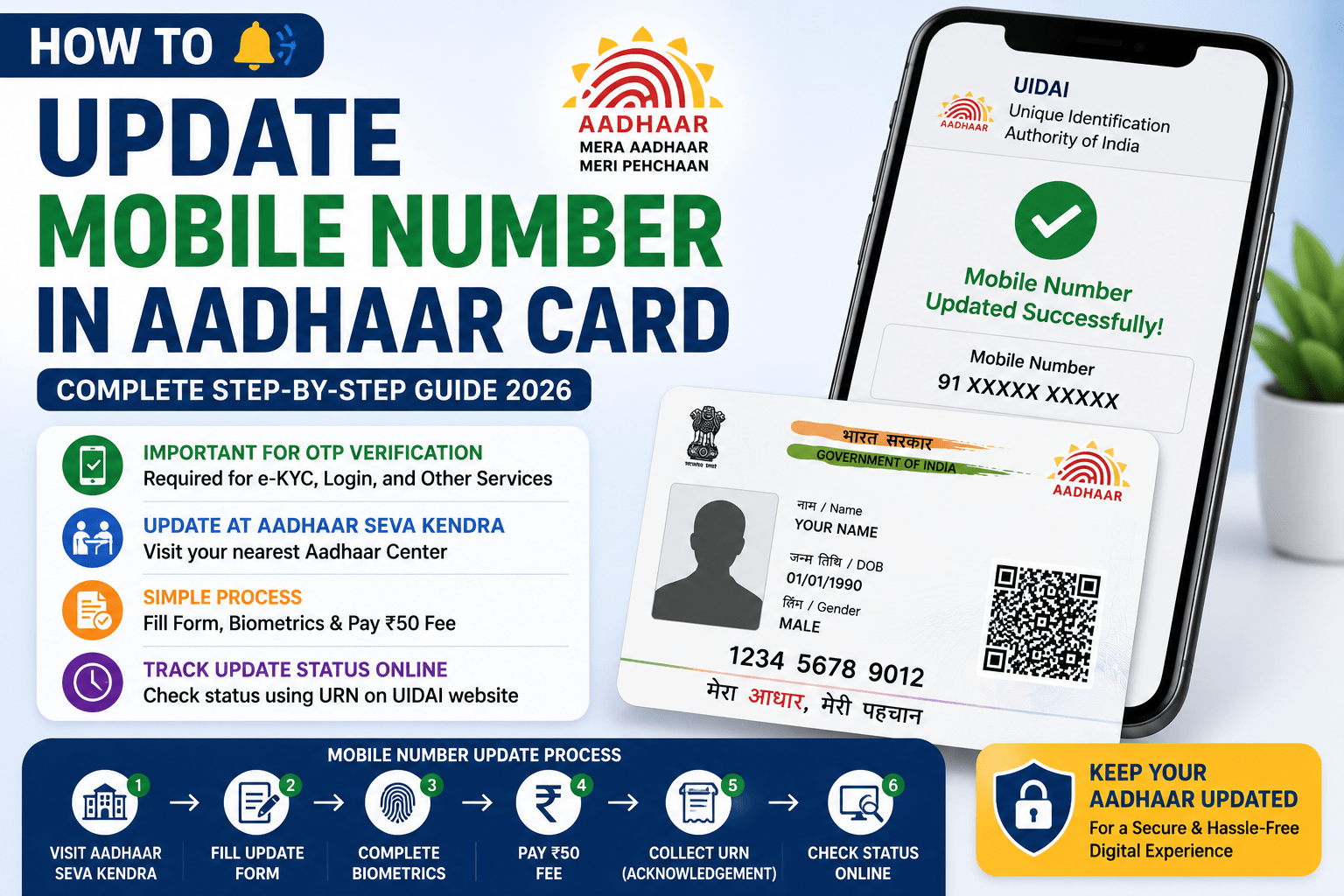
- Visit your nearest Aadhaar Seva Kendra (ASK) or authorized Aadhaar Enrollment Centre.
- Request the Aadhaar Update/Correction Form.
- Fill in your Aadhaar Number and new mobile number.
- Submit the form to the Aadhaar operator.
- Complete biometric authentication.
- Pay the update fee of ₹50.
- Collect the Update Request Number (URN) printed on the acknowledgement slip.
Your request will then be processed by UIDAI.
Can You Update Your Aadhaar Mobile Number Online?
Currently, UIDAI does not allow complete online mobile number updates because biometric verification is mandatory.
However, you can:
- Book an appointment online.
- Locate the nearest Aadhaar Seva Kendra.
- Check the update status online after submitting your request.
Therefore, you must visit an authorized Aadhaar centre to complete the mobile number update.
How to Check Aadhaar Mobile Number Update Status
After submitting your request:
- Visit the official UIDAI website.
- Click on Check Aadhaar Update Status.
- Enter your Update Request Number (URN).
- Enter the captcha code.
- Click Check Status.
The portal will display the latest status of your mobile number update request.
Aadhaar Mobile Number Update Fee
UIDAI charges a nominal fee of:
₹50 per update request
The fee includes:
- Biometric authentication.
- Processing charges.
- Update request submission.
Additionally, payment can be made at the Aadhaar Seva Kendra during the application process.
Benefits of Updating Your Mobile Number
Updating your Aadhaar mobile number provides several benefits:
- Receive OTP instantly.
- Access UIDAI online services.
- Complete e-KYC without issues.
- Download e-Aadhaar anytime.
- Apply for government schemes easily.
- Improve account security.
- Receive Aadhaar-related notifications.
As a result, keeping your mobile number updated ensures uninterrupted access to essential Aadhaar services.
Common Reasons for Update Failure
Your update request may be delayed or rejected due to:
- Incorrect Aadhaar Number.
- Wrong mobile number entered.
- Biometric authentication failure.
- Technical issues.
- Incomplete application form.
Therefore, applicants should verify all details carefully before submitting the update request.
Conclusion
How to Update Mobile Number in Aadhaar Card 2026 is a straightforward process that can be completed at any Aadhaar Seva Kendra. Although the service is currently available only through offline biometric verification, the update process is quick, affordable, and secure. Keeping your mobile number linked with Aadhaar ensures uninterrupted access to UIDAI services, government schemes, banking facilities, and digital authentication.