The Pradhan Mantri Fasal Bima Yojana (PMFBY) is the Government of India’s flagship crop insurance scheme that provides financial protection to farmers against crop losses caused by natural calamities, pests, and diseases. After reporting crop damage and completing the verification process, farmers can track their PM Fasal Bima Claim Status online through the official PMFBY portal. The portal allows farmers to monitor their application, policy, and claim settlement status from one place.
In 2026, farmers can check their claim status using their Application Number, Receipt Number, or Policy ID through the official PMFBY website. The portal also provides information on claim processing, policy details, and payment updates.
This guide explains everything about PM Fasal Bima Claim Status Check Online 2026, including eligibility, claim process, required documents, online status check, payment status, and frequently asked questions.
What is PM Fasal Bima Claim Status?
PM Fasal Bima Claim Status allows insured farmers to check the progress of their crop insurance claim after reporting crop damage.
The status generally shows:
- Claim Registration Status
- Policy Status
- Claim Verification
- Survey Status
- Claim Approval
- Claim Payment Status
- Settlement Details
Benefits of Checking Claim Status
Checking your claim status helps you:
- Track claim progress online.
- Know whether the claim is approved.
- Monitor payment updates.
- Verify policy details.
- Resolve claim-related issues quickly.
- Stay informed about settlement.
Who Can Check Claim Status?
The following farmers can check their claim status:
- PMFBY registered farmers.
- Farmers who reported crop loss.
- Farmers whose insurance policy is active.
- Farmers awaiting claim settlement.
Documents Required
Keep the following details ready.
- Application Number
- Receipt Number
- Policy ID (if available)
- Aadhaar Card
- Mobile Number
- Bank Account Details (if required)
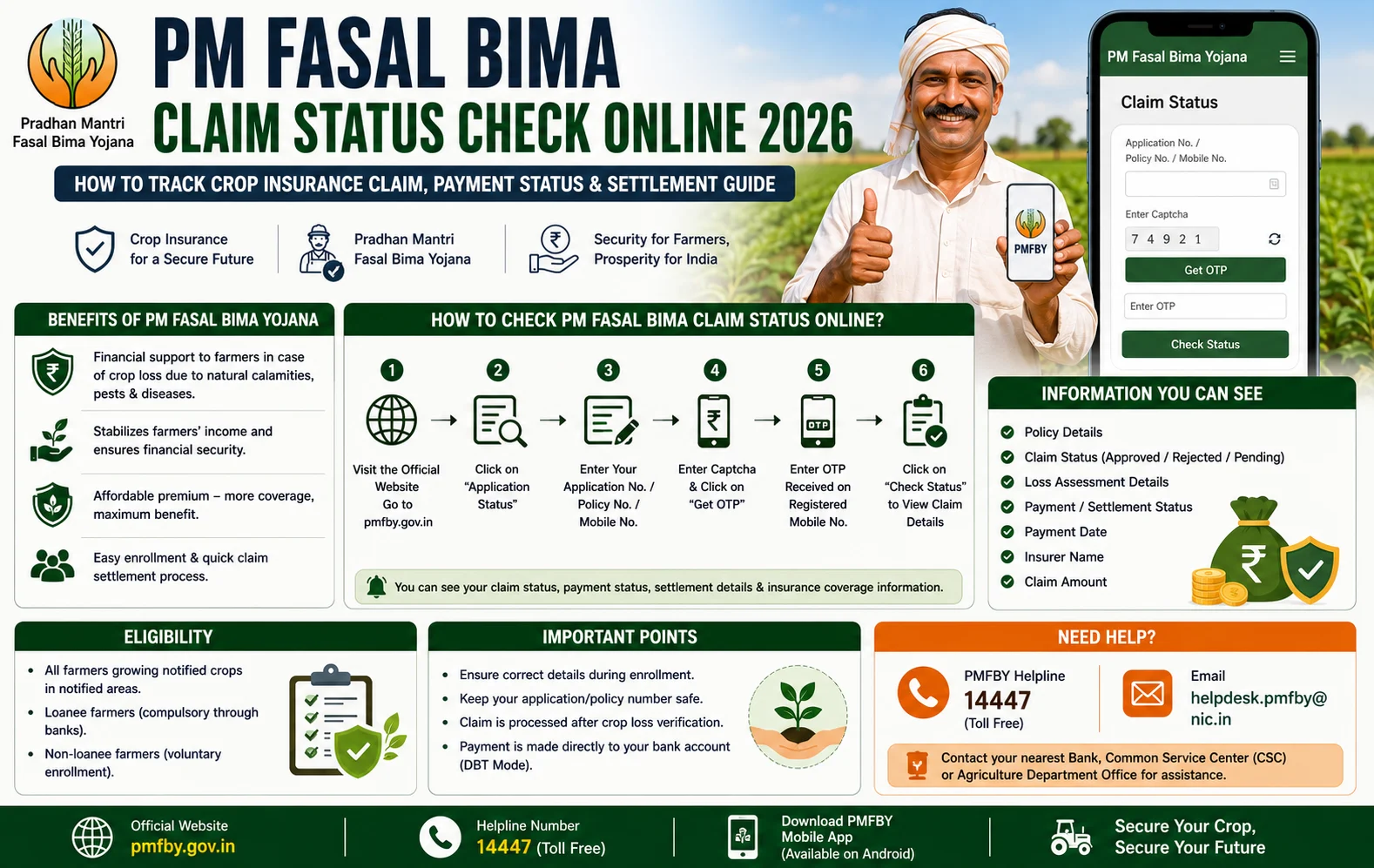
How to Check PM Fasal Bima Claim Status Online 2026
Follow these simple steps.
Step 1
Visit the official PMFBY portal.
Step 2
Click Application Status.
Step 3
Enter your:
- Application Number or
- Receipt Number or
- Policy ID (as applicable)
Step 4
Enter the security code (Captcha).
Step 5
Click Search or Submit.
Step 6
Your claim and application status will appear on the screen.
Information Available in Claim Status
After checking the status, you can view:
- Farmer Name
- Policy Number
- Crop Name
- Season
- Insurance Company
- Application Status
- Claim Status
- Survey Status
- Claim Amount
- Payment Status
PM Fasal Bima Claim Process
The claim process generally includes:
- Crop damage occurs.
- Farmer reports the loss within the prescribed time (typically within 72 hours for localized calamities and post-harvest losses).
- Field verification and assessment are conducted.
- Claim report is prepared.
- Insurance company processes the claim.
- Approved claim amount is transferred to the farmer’s bank account through DBT.
Common Claim Status Messages
Application Submitted
Your claim has been successfully registered.
Under Verification
The insurance company or concerned authority is verifying your claim.
Survey Completed
Field verification has been completed.
Claim Approved
Your claim has been approved for payment.
Payment Processed
The claim amount has been released.
Claim Rejected
The claim has not been approved. The reason may be available on the portal.
Common Reasons for Claim Rejection
Claims may be rejected because of:
- Delay in reporting crop damage.
- Incorrect policy information.
- Incomplete documents.
- Crop not covered under the policy.
- Verification failure.
- Incorrect bank account details.
How is the Claim Amount Paid?
After approval, the claim amount is generally credited directly to the farmer’s registered bank account through the Direct Benefit Transfer (DBT) system.
Important Tips
Before checking your claim status:
- Keep your Application Number or Policy ID ready.
- Report crop loss within the prescribed time.
- Ensure your Aadhaar is linked with your bank account.
- Keep your registered mobile number active.
- Track your application regularly.
- Use only the official PMFBY portal.
Frequently Asked Questions (FAQs)
How can I check my PM Fasal Bima Claim Status?
Visit the official PMFBY portal, click Application Status, enter your Application Number, Receipt Number, or Policy ID, and view your claim status.
What details are required to check the claim status?
You generally need your Application Number, Receipt Number, or Policy ID.
How is the claim amount paid?
Approved claims are transferred directly to the farmer’s registered bank account through DBT.
How long does claim settlement take?
The settlement timeline depends on crop loss assessment, submission of reports, and completion of verification by the insurance company and concerned authorities.
Can I check my policy details online?
Yes. The official PMFBY portal allows registered farmers to view policy details and application status.
Conclusion
The PM Fasal Bima Claim Status Check Online 2026 facility enables insured farmers to monitor every stage of their crop insurance claim, from application and verification to approval and payment. By reporting crop damage on time, keeping policy details ready, and regularly tracking the claim through the official PMFBY portal, farmers can stay informed about the settlement process and receive compensation without unnecessary delays.
Read More:Farmer Registry 2026: Registration, Eligibility, Benefits & Farmer ID Complete Guide