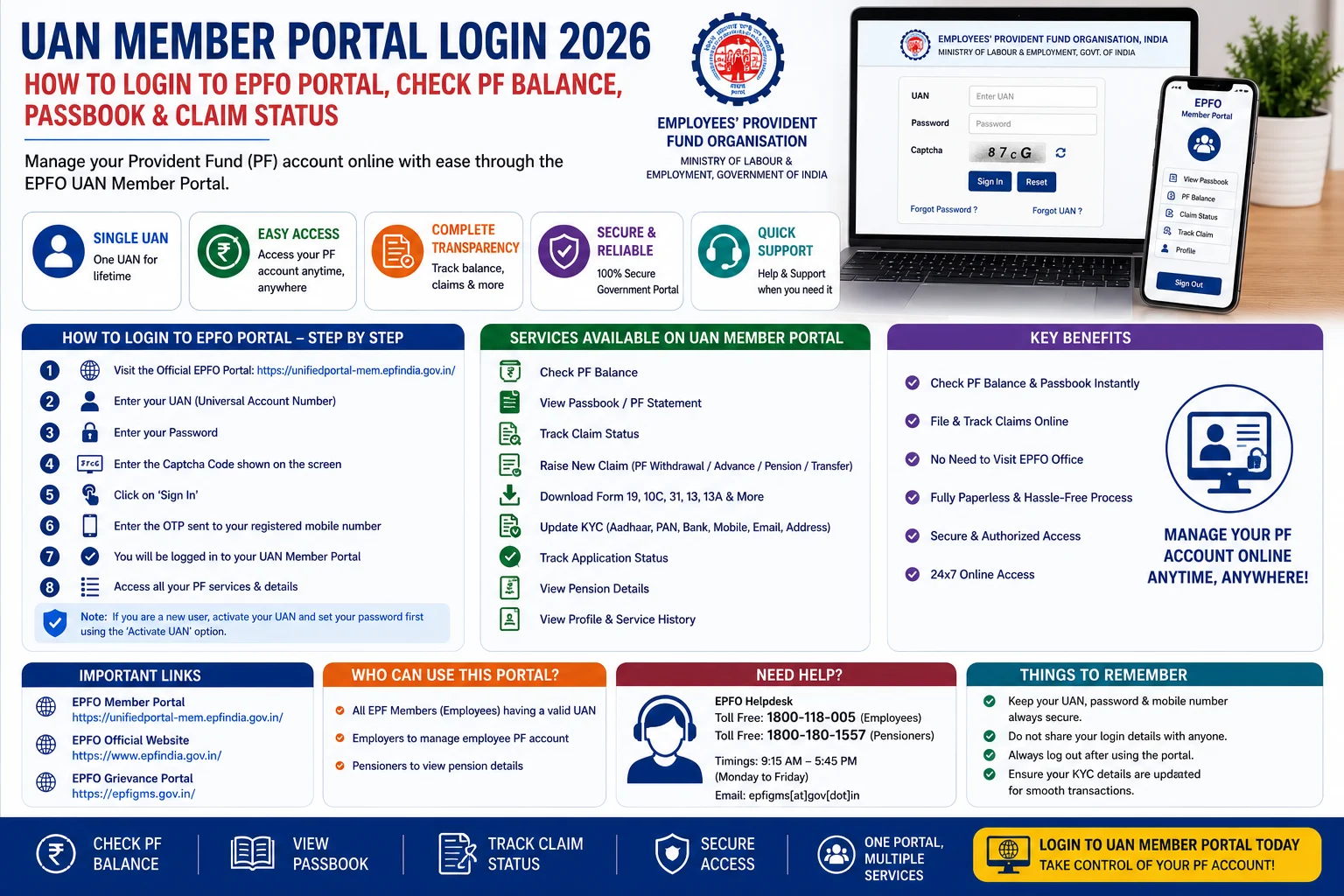
The UAN (Universal Account Number) is a unique 12-digit identification number issued by the Employees’ Provident Fund Organisation (EPFO) to every EPF member. It allows employees to manage all their Provident Fund (PF) accounts under a single account, even after changing jobs. By logging into the UAN Member Portal, users can check their PF balance, download their passbook, update KYC details, submit PF claims, transfer PF accounts, and track claim status online.
In 2026, EPFO introduced an upgraded Unified Member Portal with a modern interface and improved digital services. However, UAN activation and new UAN generation are now handled through the UMANG App using Aadhaar-based Face Authentication, while the Member Portal continues to provide access to core EPF services such as passbook, claims, KYC updates, and profile management.
This guide explains everything about UAN Member Portal Login 2026, including login steps, eligibility, required details, available services, password reset, common login issues, and FAQs.
What is UAN?
The Universal Account Number (UAN) is a permanent 12-digit number allotted by EPFO to employees covered under the Employees’ Provident Fund (EPF) Scheme.
Unlike your PF Member ID, your UAN remains the same throughout your career. Therefore, even if you change employers, you can link multiple PF accounts to one UAN and manage them from a single portal.
Benefits of UAN Member Portal
The UAN Member Portal provides several online services.
- Check EPF balance.
- Download PF passbook.
- Submit online PF withdrawal claims.
- Transfer PF account.
- Update KYC details.
- Download UAN card.
- Update profile information.
- Track claim status.
- View service history.
- Manage nominee details.
Who Can Login to the UAN Member Portal?
You can log in if you:
- Have an active UAN.
- Are registered with EPFO.
- Have created your UAN password.
- Have a registered mobile number linked with your UAN.
Details Required for Login
Before logging in, keep the following details ready:
- Universal Account Number (UAN)
- Password
- Captcha Code
- Registered Mobile Number (for OTP if required)
How to Login to UAN Member Portal 2026
Follow these simple steps.
Step 1: Visit the Official EPFO Member Portal
Open the official EPFO Unified Member Portal.
Step 2: Enter Your UAN
Type your 12-digit Universal Account Number.
Step 3: Enter Your Password
Provide the password created during UAN activation.
Step 4: Enter the Captcha
Complete the captcha verification displayed on the screen.
Step 5: Click “Sign In”
After successful verification, your EPFO Member Dashboard will open.
Services Available After Login
Once you log in, you can access several EPFO services.
Check PF Balance
View your latest EPF account balance.
Download EPF Passbook
Download your updated PF passbook showing contributions made by you and your employer.
Submit Online Claims
Apply online for:
- PF Final Settlement
- Partial PF Withdrawal
- Pension Withdrawal
- Advance Claims
Track Claim Status
Monitor the progress of your PF withdrawal or transfer application.
Update KYC
Add or update:
- Aadhaar
- PAN
- Bank Account
- Passport
- Driving Licence
Update Profile
Modify your:
- Email ID
- Mobile Number
- Address (where permitted)
Download UAN Card
Download and print your UAN card directly from the portal.
How to Check EPF Passbook
Follow these steps.
- Log in to the UAN Member Portal.
- Click Passbook.
- Select your Member ID.
- View your contribution history.
- Download the passbook if required.
Forgot UAN Password?
If you cannot remember your password:
- Open the UAN Member Portal.
- Click Forgot Password.
- Enter your UAN.
- Verify your identity using OTP.
- Create a new password.
- Log in again using the new credentials.
How to Activate UAN in 2026
EPFO has changed the UAN activation process.
Instead of activating your UAN directly through the Member Portal, eligible users must now use the UMANG App with Aadhaar-based Face Authentication for UAN activation and generation.
Common Login Problems
You may face login issues because of:
- Incorrect UAN.
- Wrong password.
- Captcha mismatch.
- Inactive UAN.
- Unregistered mobile number.
- Temporary portal maintenance.
If the portal is unavailable, wait for some time and try again. EPFO recently upgraded its systems, and temporary service interruptions may occur during maintenance or stabilization.
Benefits of Using the UAN Member Portal
Using the portal offers several advantages.
- 24×7 online access.
- Faster PF services.
- Paperless claim submission.
- Easy KYC management.
- Real-time claim tracking.
- Secure account management.
- Centralized PF records.
- Easy passbook download.
Important Tips
Before logging in:
- Use only the official EPFO website.
- Keep your registered mobile number active.
- Never share your password or OTP.
- Update your KYC details regularly.
- Check your passbook periodically to verify employer contributions.
Frequently Asked Questions (FAQs)
What is UAN?
UAN (Universal Account Number) is a permanent 12-digit number issued by EPFO to manage all your PF accounts under one login.
Can I log in using my mobile number?
No. You generally need your UAN and password to access the Member Portal.
How can I activate my UAN in 2026?
EPFO has shifted UAN activation to the UMANG App using Aadhaar-based Face Authentication.
Can I check my PF balance through the UAN Portal?
Yes. After logging in, you can view your PF balance and download your passbook.
Is the UAN Member Portal free to use?
Yes. All EPFO online member services are available free of cost through the official portal.
Conclusion
The UAN Member Portal Login 2026 makes it easy for EPF members to manage their provident fund accounts online. From checking your PF balance and downloading your passbook to updating KYC details and tracking claims, the portal provides almost every essential EPFO service in one place. Moreover, with the latest EPFO upgrades, members can enjoy faster and more efficient online services while using the UMANG App for UAN activation. Always use the official EPFO portal and keep your UAN, password, and registered mobile number secure for a safe login experience.
Read More: Minor Passport Apply Online 2026: Complete Guide to Apply for a Child Passport in India