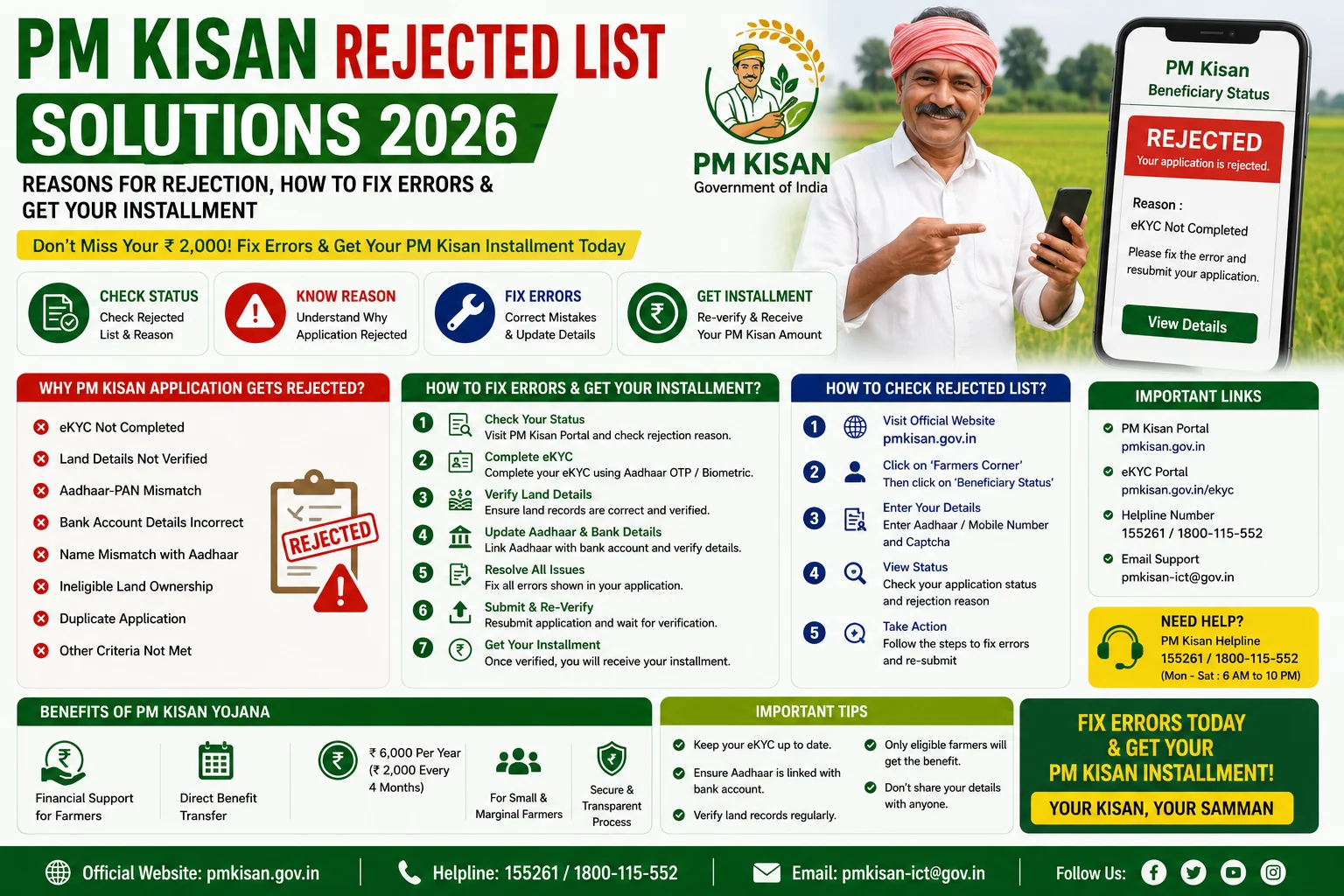
The Pradhan Mantri Kisan Samman Nidhi (PM-KISAN) scheme provides eligible farmers with ₹6,000 per year in three equal installments of ₹2,000 each. The amount is transferred directly to the beneficiary’s bank account through the Direct Benefit Transfer (DBT) system. However, many farmers do not receive their installment because their application is rejected due to incorrect details, incomplete verification, or eligibility issues.
In 2026, farmers can easily check whether their name appears in the PM Kisan Rejected List through the official PM-KISAN portal. Moreover, eligible farmers can correct their application details, complete e-KYC, update Aadhaar information, and submit the necessary corrections to receive future installments without delay.
This guide explains everything about PM Kisan Rejected List Solutions 2026, including common rejection reasons, step-by-step solutions, document requirements, correction process, and frequently asked questions.
What is the PM Kisan Rejected List?
The PM Kisan Rejected List contains the names of applicants whose PM-KISAN applications have been rejected due to verification errors, incorrect information, or failure to meet the scheme’s eligibility criteria.
Fortunately, many rejection cases can be corrected by updating the required information on the official PM-KISAN portal or through the concerned Agriculture Department.
Why is a PM Kisan Application Rejected?
There are several reasons why a PM Kisan application may be rejected.
Some of the most common reasons include:
- Aadhaar number mismatch.
- Incorrect bank account details.
- Name mismatch between Aadhaar and PM Kisan records.
- e-KYC not completed.
- Incorrect IFSC Code.
- Invalid land ownership records.
- Duplicate registration.
- Mobile number mismatch.
- Incorrect beneficiary details.
- Incomplete application.
- Farmer declared ineligible under PM-KISAN guidelines.
Therefore, applicants should verify all details carefully before submitting or updating their application.
How to Check PM Kisan Rejected List Online 2026
Follow these simple steps.
Step 1: Visit the Official PM Kisan Portal
Open the official PM-KISAN website.
Step 2: Open “Farmer Corner”
On the homepage, click Farmer Corner.
Step 3: Select Beneficiary Status
Choose the Beneficiary Status option.
Step 4: Enter Required Details
You can search using:
- Registration Number
- Mobile Number
- Aadhaar Number
Step 5: Complete Verification
Enter the captcha or OTP if required.
Step 6: View Application Status
The portal will display your application status.
If your application has been rejected, the rejection reason may also be shown.
Common PM Kisan Rejection Reasons and Solutions
1. Aadhaar Name Mismatch
Reason:
The applicant’s name in PM Kisan records does not match the Aadhaar database.
Solution:
- Update your Aadhaar details or PM Kisan registration.
- Ensure the spelling is identical in both records.
2. Aadhaar Not Linked
Reason:
Your Aadhaar is not linked with your PM Kisan account.
Solution:
- Link your Aadhaar through the official PM Kisan portal.
- Complete Aadhaar verification.
3. e-KYC Not Completed
Reason:
Mandatory e-KYC has not been completed.
Solution:
- Complete Aadhaar OTP-based e-KYC.
- If OTP verification fails, visit the nearest CSC for biometric e-KYC.
4. Incorrect Bank Account Details
Reason:
Wrong account number or IFSC Code.
Solution:
- Update your correct bank account information.
- Verify the IFSC Code carefully.
5. Land Record Verification Pending
Reason:
Your land records have not been verified.
Solution:
- Contact the local Agriculture Department or Revenue Office.
- Submit updated land ownership documents if required.
6. Duplicate Registration
Reason:
More than one PM Kisan registration exists for the same farmer.
Solution:
- Contact your Agriculture Office.
- Request cancellation of duplicate records.
7. Invalid Documents
Reason:
Supporting documents are incorrect or incomplete.
Solution:
- Upload valid documents.
- Ensure all information matches official records.
Documents Required for Correction
Keep the following documents ready while requesting corrections.
- Aadhaar Card
- Bank Passbook
- Land Ownership Documents
- Registered Mobile Number
- PM Kisan Registration Number
- Identity Proof
- Address Proof
How to Correct PM Kisan Application Online
Follow these steps to update your details.
Step 1
Visit the official PM Kisan portal.
Step 2
Open Farmer Corner.
Step 3
Click Update Details or the relevant correction service available for your record.
Step 4
Enter your Registration Number or Aadhaar Number.
Step 5
Update the incorrect information.
Step 6
Submit the correction request.
After verification, eligible corrections will be updated in the PM Kisan database.
How Long Does Correction Take?
Correction requests are usually verified by the concerned authorities.
The processing time depends on:
- Aadhaar verification.
- Land record verification.
- Bank verification.
- State Agriculture Department processing.
Therefore, check your application status regularly after submitting corrections.
Benefits of Correcting Rejected Applications
Correcting your application helps you:
- Receive pending installments (if eligible under scheme rules).
- Continue receiving future PM Kisan payments.
- Complete Aadhaar verification.
- Maintain accurate beneficiary records.
- Avoid future payment failures.
Important Tips
Before submitting corrections:
- Enter your Aadhaar details correctly.
- Complete mandatory e-KYC.
- Verify your bank account information.
- Keep your mobile number active.
- Check your application status regularly.
- Use only the official PM Kisan portal.
Frequently Asked Questions (FAQs)
How can I check if my PM Kisan application is rejected?
You can check your application status through the official PM Kisan Beneficiary Status service using your Registration Number, Aadhaar Number, or Mobile Number.
Can I correct my rejected PM Kisan application?
Yes. Many rejected applications can be corrected by updating Aadhaar details, bank information, e-KYC, or land records, depending on the reason for rejection.
Is e-KYC mandatory?
Yes. Eligible beneficiaries must complete e-KYC to continue receiving PM Kisan installments.
Will I receive pending installments after correction?
If your application becomes eligible after successful verification, payments are processed according to the scheme rules and government guidelines.
Where can I get help for PM Kisan corrections?
You can contact:
- Your District Agriculture Office.
- Common Service Centre (CSC).
- PM Kisan Help Desk.
- State Agriculture Department.
Conclusion
The PM Kisan Rejected List Solutions 2026 guide helps farmers understand why their applications are rejected and how they can resolve common issues. Moreover, by completing e-KYC, correcting Aadhaar details, updating bank information, and verifying land records, eligible farmers can improve their chances of receiving future PM Kisan installments. Always use the official PM-KISAN portal for checking your application status and submitting corrections to ensure a secure and hassle-free process.