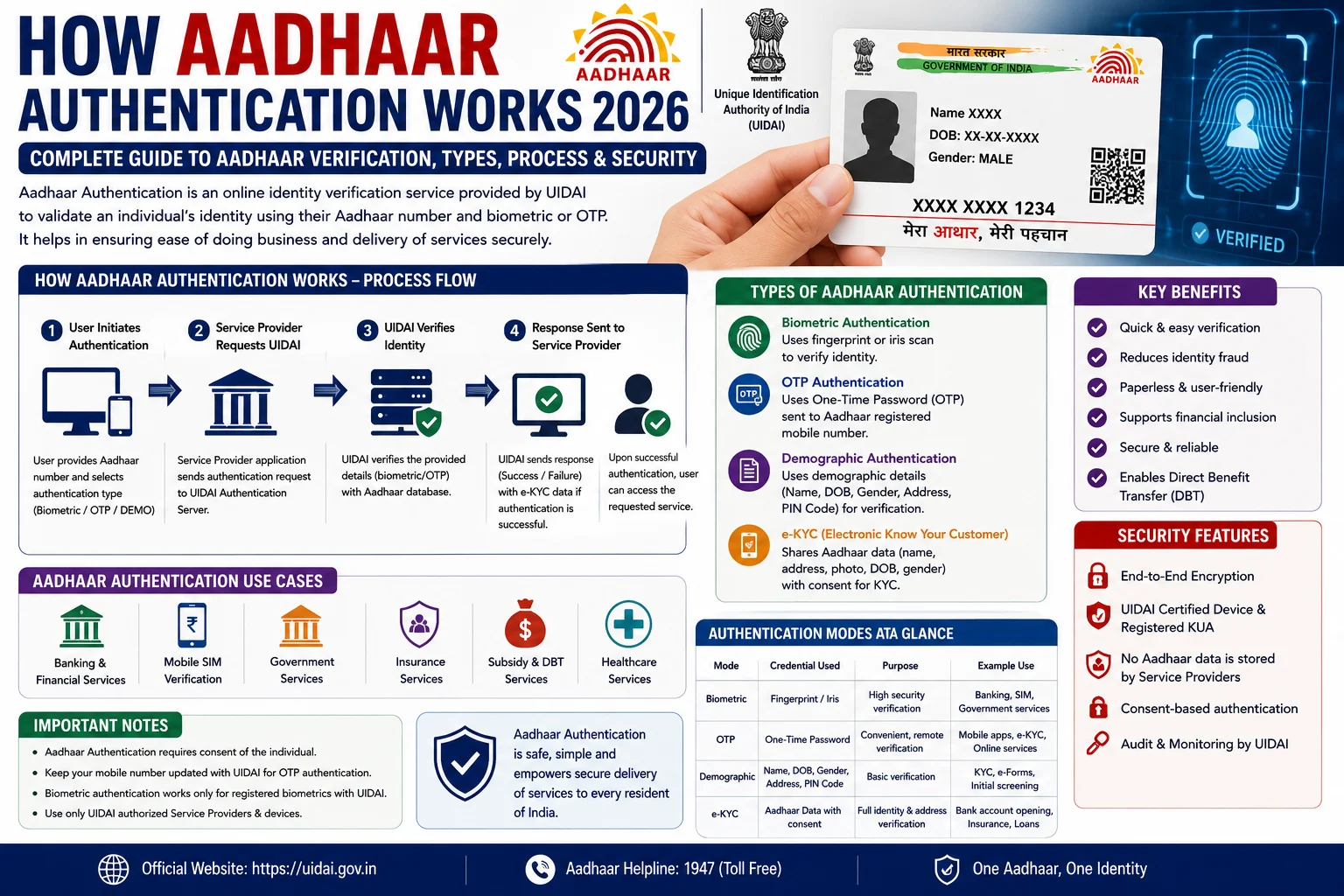
Aadhaar Authentication is a secure digital verification process developed by the Unique Identification Authority of India (UIDAI). It allows government departments, banks, telecom companies, financial institutions, and other authorized agencies to verify an individual’s identity using their Aadhaar number or Virtual ID (VID). During authentication, UIDAI checks whether the information submitted by the requesting agency matches the records stored in the Aadhaar database and returns only a “Yes/No” response or limited e-KYC information, depending on the type of authentication and the user’s consent. This process helps prevent identity fraud while ensuring quick and reliable verification.
In 2026, Aadhaar Authentication has become one of the most widely used identity verification systems in India. It is used for opening bank accounts, receiving Direct Benefit Transfer (DBT) benefits, SIM card verification, passport services, EPFO services, income tax verification, scholarship schemes, and many other government and private services. UIDAI has also strengthened authentication security by promoting the use of Virtual ID (VID), biometric locking, and authentication history tracking.
This guide explains everything about How Aadhaar Authentication Works 2026, including authentication types, verification process, security measures, benefits, and frequently asked questions.
What is Aadhaar Authentication?
Aadhaar Authentication is the process through which an authorized agency verifies the identity of an Aadhaar holder using information submitted against the records maintained by UIDAI.
Instead of sharing your complete Aadhaar data, UIDAI confirms whether the information matches its database. Depending on the authentication type and your consent, UIDAI may provide a simple confirmation or limited electronic KYC information.
Why is Aadhaar Authentication Used?
Aadhaar Authentication helps organizations verify identities quickly and securely.
It is commonly used for:
- Bank account opening
- Government subsidy schemes
- PAN verification
- EPFO services
- Passport application
- SIM card activation
- Scholarship verification
- Pension schemes
- LPG subsidy
- Digital KYC
- Financial services
- Welfare scheme verification
Types of Aadhaar Authentication
UIDAI provides multiple authentication methods.
1. OTP Authentication
An OTP is sent to the Aadhaar-linked mobile number.
The user enters the OTP to complete verification.
Common uses include:
- Online KYC
- Government portals
- Banking services
- Digital applications
2. Biometric Authentication
Verification is completed using:
- Fingerprints
- Iris Scan
- Face Authentication (where supported)
Biometric authentication is widely used at Aadhaar Seva Kendras, banks, and Common Service Centres (CSCs).
3. Demographic Authentication
The agency verifies demographic details such as:
- Name
- Date of Birth
- Gender
- Address
These details are matched with UIDAI records.
4. Multi-Factor Authentication
Some services use a combination of:
- Aadhaar Number or VID
- OTP
- Biometric Authentication
This provides an additional layer of security.
How Aadhaar Authentication Works
The authentication process follows these steps.
Step 1: User Provides Aadhaar Details
The resident shares:
- Aadhaar Number, or
- Virtual ID (VID)
Some services may also require biometric data or OTP.
Step 2: Authentication Request is Sent
The authorized agency securely sends the authentication request to UIDAI.
Step 3: UIDAI Verifies the Information
UIDAI compares the submitted information with its Aadhaar database.
Step 4: Authentication Response
If the information matches:
- Authentication Successful
- “Yes” response returned
If the information does not match:
- Authentication Failed
- “No” response returned
For e-KYC services, limited demographic information is shared only with the Aadhaar holder’s consent.
What Information is Verified?
Depending on the authentication type, UIDAI may verify:
- Aadhaar Number
- Virtual ID (VID)
- Fingerprints
- Iris Scan
- Face Authentication
- OTP
- Demographic Information
What is Aadhaar e-KYC?
Electronic Know Your Customer (e-KYC) is a secure service that allows authorized organizations to receive verified identity information electronically after obtaining the Aadhaar holder’s consent.
It helps eliminate paper-based verification and speeds up customer onboarding.
What is Offline Aadhaar Authentication?
Offline Aadhaar verification allows users to verify their identity without contacting the UIDAI authentication server.
This can be done using:
- Aadhaar Offline e-KYC XML
- Secure QR Code
- Masked Aadhaar
Offline verification provides better privacy because it does not require live authentication.
Security Features of Aadhaar Authentication
UIDAI has implemented several security measures.
These include:
- Encrypted communication
- Secure authentication servers
- Virtual ID (VID)
- Biometric Lock/Unlock
- OTP verification
- Authentication History
- Digitally signed responses
- Resident consent for e-KYC
These measures help protect Aadhaar holders against identity misuse.
Benefits of Aadhaar Authentication
Aadhaar Authentication offers several advantages.
- Fast identity verification.
- Paperless KYC.
- Secure digital verification.
- Reduces fraud.
- Instant verification.
- Supports government welfare schemes.
- Convenient online services.
- Improves service delivery.
- Saves time and paperwork.
How to Check Aadhaar Authentication History
You can monitor all authentication requests made using your Aadhaar.
Steps:
- Visit the official UIDAI website.
- Select Authentication History.
- Enter your Aadhaar Number or VID.
- Verify using OTP.
- View your authentication records.
Regularly checking your authentication history helps identify any unauthorized usage.
How to Secure Your Aadhaar
To protect your Aadhaar:
- Lock your biometrics when not required.
- Use Virtual ID (VID) instead of your Aadhaar Number whenever possible.
- Never share OTPs.
- Download Aadhaar only from the official UIDAI website.
- Review your authentication history regularly.
- Share Aadhaar details only with authorized agencies.
Common Authentication Errors
Authentication may fail because of:
- Incorrect Aadhaar Number.
- Wrong OTP.
- Mobile number not linked with Aadhaar.
- Fingerprint mismatch.
- Iris scan mismatch.
- Locked biometrics.
- Network or server issues.
If authentication fails repeatedly, update your biometric information or contact the nearest Aadhaar Seva Kendra.
Frequently Asked Questions (FAQs)
What is Aadhaar Authentication?
Aadhaar Authentication is the process of verifying an individual’s identity using Aadhaar information through UIDAI’s secure authentication system.
Is Aadhaar Authentication safe?
Yes. UIDAI uses encrypted communication, secure servers, OTP verification, biometric protection, and resident consent mechanisms to safeguard Aadhaar authentication.
Can I use Virtual ID instead of Aadhaar Number?
Yes. UIDAI encourages the use of Virtual ID (VID) as an alternative to sharing your Aadhaar Number for authentication.
Can I check where my Aadhaar was used?
Yes. UIDAI provides an Authentication History service that allows residents to view previous authentication requests.
What happens if authentication fails?
Authentication may fail due to incorrect information, biometric mismatch, OTP errors, or technical issues. You should verify your details or update your Aadhaar information if required.
Conclusion
The How Aadhaar Authentication Works 2026 guide helps users understand how UIDAI securely verifies identities using Aadhaar, OTP, biometrics, demographic details, and Virtual ID. Aadhaar Authentication has become the backbone of digital identity verification across banking, telecom, government welfare schemes, and financial services in India. By using secure technologies such as encryption, biometric protection, Virtual ID, and authentication history monitoring, UIDAI ensures that Aadhaar verification remains fast, reliable, and privacy-focused. Always use official UIDAI services and review your authentication history regularly to keep your Aadhaar secure.
Read More:Aadhaar FAQs Every Citizen Should Know 2026: Top Questions & Answers About Aadhaar Card