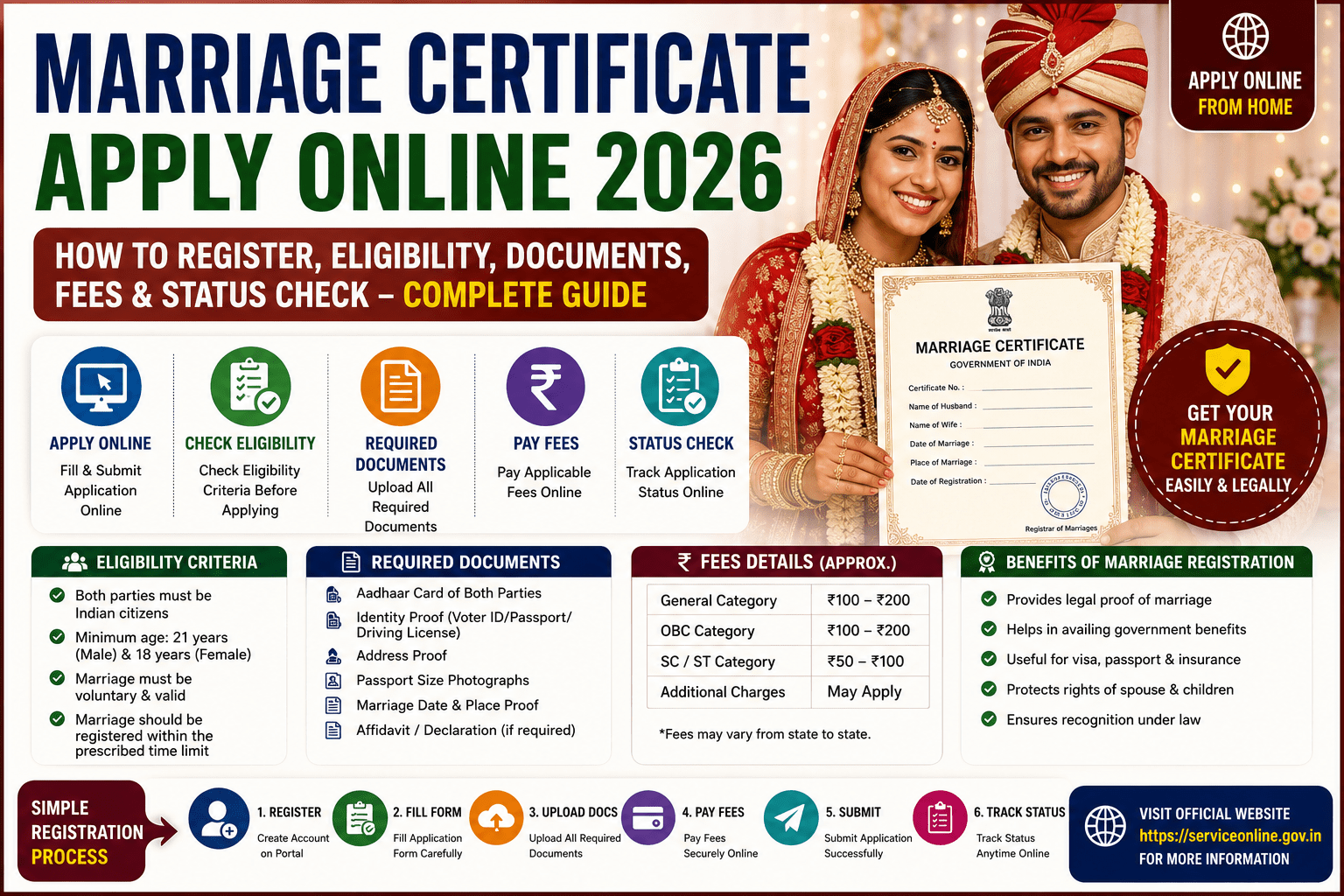
A Marriage Certificate is an official legal document issued by the State Government that confirms a marriage has been legally registered. In India, marriage registration is governed by the Hindu Marriage Act, 1955, the Special Marriage Act, 1954, and other personal laws applicable to different communities. A marriage certificate serves as valid proof of marriage and is required for various legal, financial, and administrative purposes such as passport applications, visa processing, name change, bank account updates, insurance claims, property matters, and government benefits.
In 2026, most State Governments allow couples to apply for a Marriage Certificate online through their respective State e-District Portal, Municipal Corporation Portal, or Marriage Registration Portal. Applicants can complete the registration process by submitting the required documents, booking an appointment (where applicable), and visiting the Registrar’s office for verification.
This guide explains everything about Marriage Certificate Apply Online 2026, including eligibility, required documents, application process, fees, validity, status check, and frequently asked questions.
What is a Marriage Certificate?
A Marriage Certificate is a government-issued document that officially records the marriage between two individuals.
It serves as legal proof of marriage and contains important details such as:
- Husband’s Name
- Wife’s Name
- Date of Marriage
- Place of Marriage
- Registration Number
- Date of Registration
- Registrar’s Signature
Benefits of a Marriage Certificate
A Marriage Certificate offers several important benefits.
- Legal proof of marriage.
- Required for passport applications.
- Helpful for spouse visa applications.
- Useful for changing surname after marriage.
- Required for joint bank accounts.
- Helps in insurance and pension claims.
- Useful in property and inheritance matters.
- Accepted as supporting proof for government schemes.
Who Can Apply?
Couples can apply for marriage registration if they:
- Are legally married.
- Meet the minimum legal age.
- Fulfill the conditions prescribed under the applicable marriage law.
- Are residents of the concerned State or the marriage took place within the jurisdiction of the registering authority.
Eligibility Criteria
Generally, applicants should satisfy the following conditions:
- Groom must be 21 years or above.
- Bride must be 18 years or above.
- Both parties must give free consent.
- Neither party should have a living spouse at the time of marriage (except where permitted under applicable personal law).
- The marriage should be legally valid under the applicable law.
Documents Required
Keep the following documents ready before applying.
- Aadhaar Card of both spouses
- PAN Card (if available)
- Address Proof
- Age Proof (Birth Certificate, Class 10 Certificate, Passport, etc.)
- Wedding Photograph
- Passport-size Photographs of both spouses
- Marriage Invitation Card (if available)
- Marriage Proof issued by the religious institution (if applicable)
- Identity Proof of Witnesses
- Aadhaar Card of Witnesses
- Residence Proof
- Mobile Number
The exact list of documents may vary depending on the state.
Witness Requirement
Most states require two or three adult witnesses during marriage registration.
Witnesses should carry:
- Aadhaar Card
- Identity Proof
- Passport-size Photograph (if required)
How to Apply for Marriage Certificate Online 2026
Follow these simple steps.
Step 1
Visit your State Government’s Marriage Registration Portal or e-District Portal.
Step 2
Register using your mobile number or create a user account.
Step 3
Login to the portal.
Step 4
Select Marriage Registration.
Step 5
Fill in:
- Husband’s Details
- Wife’s Details
- Marriage Details
- Address
- Witness Details
Step 6
Upload the required documents.
Step 7
Pay the prescribed registration fee.
Step 8
Book an appointment if required.
Step 9
Visit the Marriage Registrar’s Office along with your spouse and witnesses for document verification.
Step 10
After successful verification, the Marriage Certificate will be issued.
Offline Application Process
Applicants can also apply by visiting:
- Marriage Registrar Office
- Municipal Corporation Office
- Sub-Registrar Office
- SDM Office (where applicable)
Submit the application form along with supporting documents and complete the verification process.
Application Fee
The registration fee varies depending on:
- State Government
- Applicable Marriage Act
- Registration timeline
Applicants should check the official state portal for the latest fee details.
Processing Time
Generally, Marriage Certificates are issued within:
- 7–30 working days
The processing time depends on the applicable law and the verification process followed by the respective state authority.
How to Check Marriage Certificate Status
Follow these steps.
- Visit the official Marriage Registration Portal.
- Click Track Application Status.
- Enter:
- Application Number
- Registration Number
- Mobile Number (if required)
- Click Submit.
- View the latest application status.
How to Download Marriage Certificate
After approval:
- Login to the Marriage Registration Portal.
- Open Issued Certificates.
- Select your application.
- Download the digitally signed Marriage Certificate PDF.
Availability of online download depends on the services offered by the respective State Government.
Validity of Marriage Certificate
A legally issued Marriage Certificate remains valid for a lifetime unless cancelled or modified by a competent authority.
Common Reasons for Application Rejection
Applications may be rejected because of:
- Incorrect personal details.
- Missing documents.
- Age criteria not fulfilled.
- Invalid identity proof.
- Incorrect witness details.
- Mismatch in submitted information.
- Incomplete application.
Applicants should carefully verify all details before submitting the application.
Important Tips
Before applying:
- Use only the official State Government portal.
- Ensure all uploaded documents are clear and valid.
- Carry original documents during verification.
- Keep your registered mobile number active.
- Save the acknowledgement receipt.
- Attend the appointment on the scheduled date.
Frequently Asked Questions (FAQs)
Who can apply for a Marriage Certificate?
Any legally married couple meeting the eligibility conditions under the applicable marriage law can apply for a Marriage Certificate.
Can I apply for a Marriage Certificate online?
Yes. Most State Governments provide online marriage registration services through their official Marriage Registration or e-District portals.
Is Aadhaar mandatory?
Many states request Aadhaar as an identity document, but the exact document requirements depend on the respective State Government’s rules.
How many witnesses are required?
Most states require two or three adult witnesses for marriage registration.
How long does it take to receive the Marriage Certificate?
The certificate is generally issued within 7 to 30 working days, depending on the state and verification process.
Conclusion
The Marriage Certificate Apply Online 2026 process has made marriage registration easier and more accessible across India. A Marriage Certificate is an important legal document that helps couples access government services, apply for passports and visas, update official records, and protect their legal rights. Before applying, ensure that all required documents are ready, provide accurate information, and complete the verification process through the official State Government portal or the designated Marriage Registrar’s office.